
I wanted to see if I could train my SO-101 robot arm to do a basic pick-and-place task: grab an object and drop it into a container.
A whole lot of calibration issues, a bunch of teleoperation demos, and making a mistke to train on my MacBook, and eventually a policy that actually worked.
SO-101
The SO-101 is a cheap, open-source 6-DOF robot arm from Hugging Face and The Robot Studio. For this setup I used a pair of arms: a leader arm that I moved by hand, and a follower arm that copied those movements in real time.
That leader-follower setup is what makes teleoperation easy to get started with. You don't need to write a controller for the task up front. You just perform the task yourself and record the demonstrations.
The arms use Feetech serial bus servos over USB and are surprisingly capable for the price. The BOM is under $200 per arm, which makes this one of the more approachable real robot setups I've used.
LeRobot
LeRobot is the library doing most of the heavy lifting here. It handles robot communication, dataset recording, training, and policy deployment.
For this project, LeRobot handled:
- Connecting to both arms over serial
- Streaming camera feeds
- Recording demonstration datasets
- Pushing the dataset to the Hugging Face Hub
- Training an ACT policy
- Running that trained policy on the real robot
One thing I like about LeRobot is that the path from "robot on desk" to "recording data" is pretty short. You can get to a working pipeline without writing a ton of boilerplate.
ACT
ACT (Action Chunking with Transformers) is an imitation learning policy from the ALOHA project by Tony Zhao et al.
The main idea is that it predicts a chunk of future actions instead of just the next action. In practice, that helps because single-step behavior cloning tends to drift once the robot makes a small mistake and ends up in a state it did not really see during training.
With ACT, the policy commits to a short sequence of actions, usually something like the next 50-100 timesteps. That tends to produce smoother motion and fewer chances to immediately go off track.
Under the hood, ACT uses a CVAE plus a transformer. During training, a VAE encoder compresses the full action sequence into a latent variable. The main transformer then uses image features and joint states to predict the action chunk. At inference time, the encoder is dropped and the policy predicts actions directly from the current observation.
The default model is around 80 million parameters, trains in a few hours on a single GPU, and can work surprisingly well with around 50 demonstrations.
ACT itself is super cool and deserves a blog of its own. How it works, why action chunking matters, the CVAE setup, all of it. I'm not going to go deep here since this post is about training a policy and running it on the SO-101. I'll write a dedicated blog on just ACT and its inner workings.
Calibration
Calibration was easily the most annoying part of this whole project.
Before you do anything useful, both arms need to be calibrated so the raw encoder values map to sensible joint angles. If that calibration is off, teleoperation feels wrong immediately and everything downstream gets worse.
The basic process is simple enough: move each joint through its range of motion and let the calibration script record the limits. The annoying part is that the real hardware does not line up perfectly with the ideal ranges, and you still have to sanity-check the result yourself.
The main pain points were:
- The servos have mechanical limits that do not always match the expected ranges
- You have to hold the arm in specific poses, including a zero pose, and it is easy to be a little off
- If calibration is even slightly wrong, the follower arm can move in ways you did not expect when teleoperation starts
- You have to do this for both arms, so one bad calibration can waste a lot of time
I reran calibration a few times before I trusted it. The auto-calibration script helps, but there is still a judgment call involved.
# Follower arm calibration from lerobot.robots.so_follower import SO101FollowerConfig, SO101Follower robot_config = SO101FollowerConfig( port="/dev/tty.usbmodem5AE60541771", id="follower_arm", ) robot = SO101Follower(robot_config) robot.connect() robot.calibrate()
# Leader arm calibration from lerobot.teleoperators.so_leader import SO101LeaderConfig, SO101Leader teleop_config = SO101LeaderConfig( port="/dev/tty.usbmodem5AE60527381", id="leader_arm", ) teleop = SO101Leader(teleop_config) teleop.connect() teleop.calibrate()
If I were doing this again, I would still move slowly here and verify the zero pose visually before recording any data. Bad calibration means bad demos, and bad demos mean bad policy behavior.
Recording Data
Once calibration looked good, I started recording demonstrations. The task was simple: pick up a black object and drop it into a container.
Setup
I used two cameras, one top-down and one front-facing, both at 1920x1080 and 30 FPS. Two views made a noticeable difference. A single camera would have worked for a quick experiment, but the extra view gave the policy much better spatial information.
camera_config = { "top": OpenCVCameraConfig(index_or_path=0, width=1920, height=1080, fps=30), "front": OpenCVCameraConfig(index_or_path=1, width=1920, height=1080, fps=30), }
Dataset Format
LeRobot stores each episode as a sequence of timesteps. Each timestep contains observations and actions:
- Observations: camera frames plus the follower arm joint positions
- Actions: the commanded joint positions for the follower arm, derived from the leader arm pose
The videos are stored as .mp4 files and the tabular data goes into Parquet. Once the dataset is recorded, pushing it to the Hugging Face Hub is basically one command.
dataset = LeRobotDataset.create( repo_id="taham655/so101_pick_place_v2", fps=30, root=dataset_root, robot_type=robot.name, features=dataset_features, use_videos=True, image_writer_processes=0, image_writer_threads=8, )
dataset.push_to_hub(private=True)
Teleoperation
Teleoperation was harder than I expected.
The basic idea is simple: move the leader arm and let the follower copy it. In practice, you are trying to move smoothly, complete the task correctly, hit the object consistently, and reset the scene between episodes without drifting too much.
Some of the early episodes were pretty shaky. The arm has its own feel, and there is a bit of latency between what you do and what the follower does. It takes a few runs before your movements start looking consistent.
I started with 5 episodes just to sanity-check the whole pipeline. I wanted to make sure data was saving correctly, the cameras were actually useful, and the joint values looked reasonable. I trained a quick model on those five episodes mostly as a smoke test.
The result was not good enough to use, but it was good enough to prove the pipeline worked end to end. The arm at least moved toward the object in a way that looked plausible.
After that I went back and recorded 50 episodes total. That took about 55 minutes of actual work. Roughly 30 seconds to do the episode, then another 30 seconds to reset everything and do it again.
Rerun
One thing that helped a lot during recording was LeRobot's Rerun integration.
init_rerun(session_name="recording")
That gives you a live view of the camera feeds, joint positions, and action signals while you record. It made it much easier to catch bad framing, weird joint behavior, or recordings that were not capturing what I thought they were capturing.
Training
First Attempt on a MacBook
After recording the dataset and pushing it to the Hub, I kicked off training locally on my MacBook Pro using MPS:
uv run lerobot-train \ --dataset.repo_id="taham655/so101_pick_place" \ --policy.type="act" \ --policy.device="mps" \ --steps=50000 \ --batch_size=2
This was a bad idea.
The fan went loud immediately and the laptop got hot fast. I left it running overnight anyway.
After 9 hours, it had only reached about 12,000 steps out of 50,000. At that pace the full run would take around 37 hours, which was not worth it.
Moving to RunPod
I was complaining to a friend about how long training was taking and he basically asked why I was not just renting a GPU. He was right.
So I spun up a RunPod instance with an RTX 4090 and ran the CUDA version:
uv run lerobot-train \ --dataset.repo_id="taham655/so101_pick_place_v2" \ --policy.type="act" \ --policy.device="cuda" \ --policy.use_amp=true \ --steps=50000 \ --batch_size=2 \ --policy.push_to_hub=true \ --policy.repo_id=taham655/act_so101_pick_place_v2
The full 50,000-step run finished in roughly 2 hours and cost a few dollars. That was the point where I stopped pretending local laptop training was a good use of time.

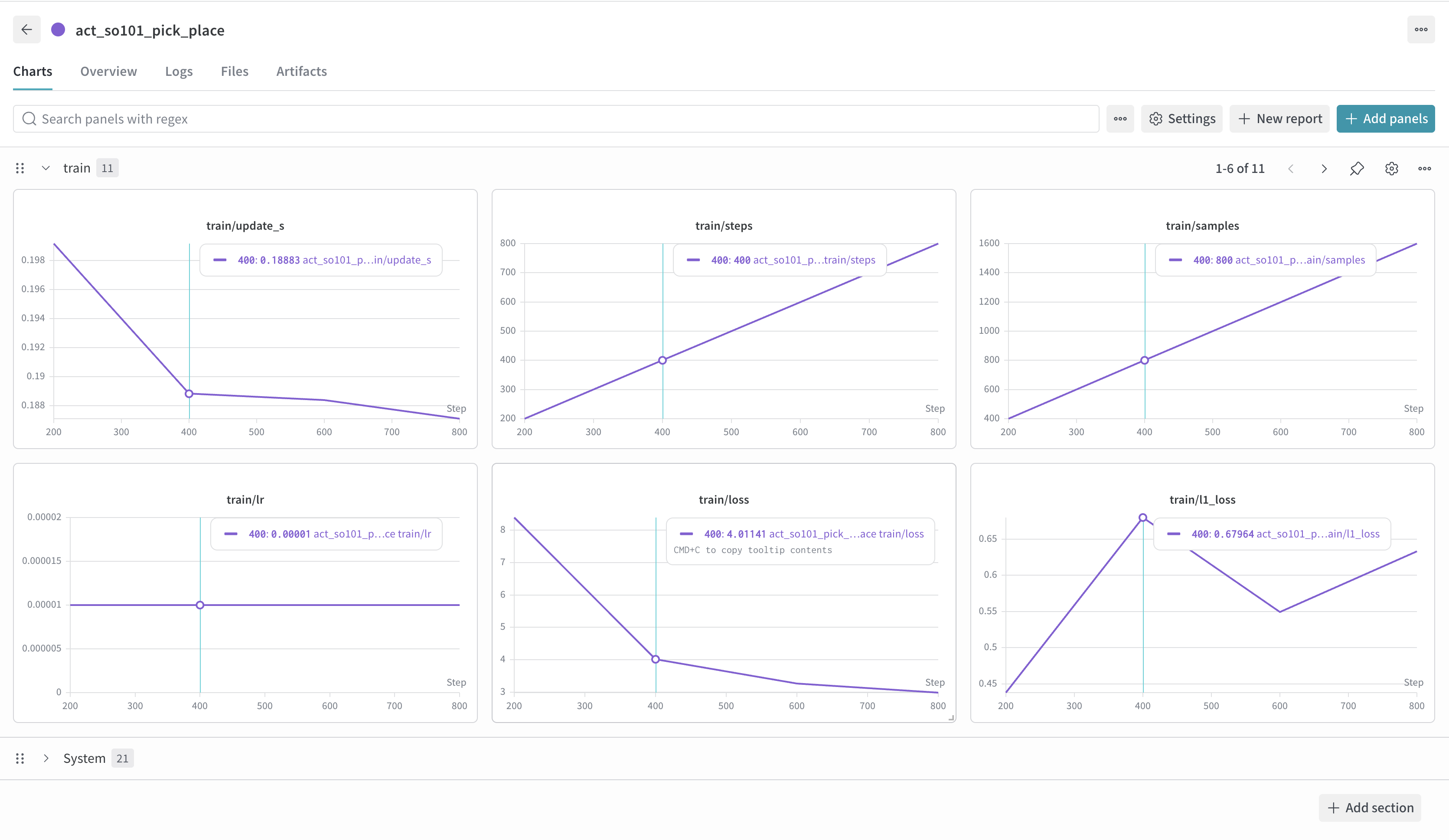
The loss curve looked healthy and training was stable the whole way through.
Running the Policy
Once the trained model was on the Hub, loading it back into the robot code was straightforward:
from lerobot.policies.act.modeling_act import ACTPolicy policy = ACTPolicy.from_pretrained("taham655/act_so101_pick_place_v2")
And it worked. The arm moved to the object, picked it up, and dropped it into the container.
It is not perfect. It does not succeed every time, and it is still sensitive to the starting position of the object. But it was good enough to feel real, which was the whole point of the experiment.
What I'd Do Again
A few takeaways after going through the whole thing:
Take calibration seriously. It is tedious, but it affects everything after it. If something looks off, redo it before you start recording data.
Record more demos than you think you need. Fifty episodes got me something usable, but more data would almost certainly help with consistency.
Use a cloud GPU from the start. Training on a laptop technically works, but it is slow and not worth the heat.
Use Rerun while recording. Being able to see the robot state and camera feeds live makes it much easier to catch bad demos early.
Overall, the full pipeline felt more accessible than I expected. The SO-101 is a solid platform for the price, LeRobot makes the software side manageable, and ACT gave me a decent result without needing a massive dataset.
If you want to get into robot learning without spending a fortune, this is a pretty good place to start.
Dataset: taham655/so101_pick_place_v2